


Technical SEO Audit Checklist: A Step-by-Step Guide
A technical SEO audit checks whether Google can crawl, render and index the pages that matter to your business. The useful part is not the list of checks; it is the order. A forgotten noindex on a service page outweighs 200 warnings about image alt text. This checklist follows the same order Google processes a page, so the issues that block everything else surface first, and it ends with a simple rule to prioritize fixes when time and budget are limited.
Before you start: scope, tools and a change log
Three things save hours later:
- Google Search Console access for the property (domain property if possible). It is the only source that shows how Google itself sees your URLs.
- A crawler such as Screaming Frog or the site audit in Semrush or Ahrefs, to see the site the way a bot does.
- A change log. Write down every fix with its date. Without it, you cannot tell a fix’s effect apart from a Google update or seasonality when you read the data later.
Also define scope: a 40-page service site and an ecommerce store with faceted filters have very different risks. Not every check below applies to every site.
The checklist, in the order Google processes a page
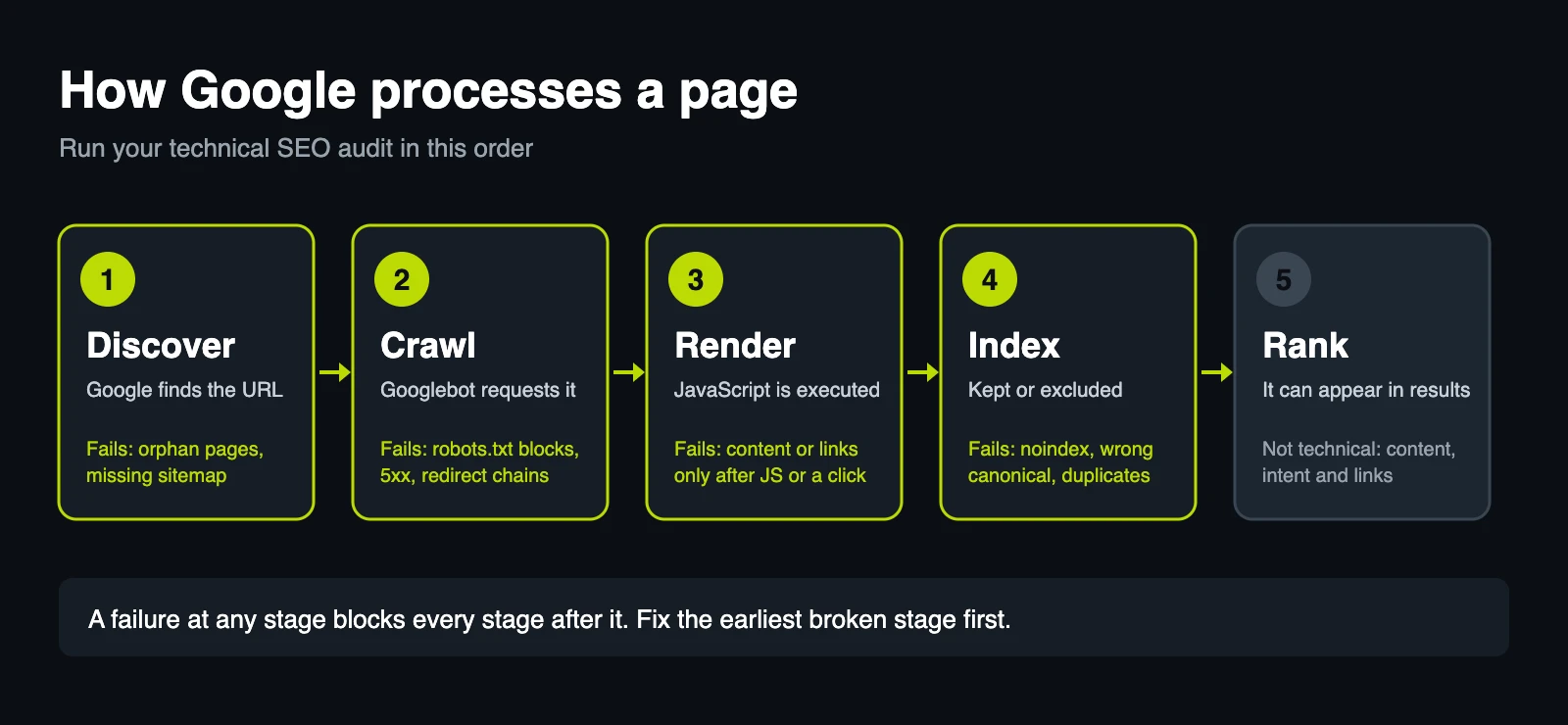
Google discovers a URL, crawls it, renders its JavaScript if needed, decides whether to index it, and only then can it rank. A failure early in that chain cancels everything after it.
Step 1: Crawling
- robots.txt doesn’t block what should rank. How to check: open
/robots.txtand test key URLs with the URL Inspection tool in Search Console. Also confirm it doesn’t block CSS or JS files the page needs to render. - Key pages return 200. How to check: crawl the site and filter by status code. Watch for intermittent 5xx errors and 404s linked from the main menu.
- Redirects are single-hop 301s. How to check: look for chains (A → B → C) and loops, especially after a migration or redesign.
- The XML sitemap lists only indexable, canonical URLs, and it is submitted in Search Console.
- No broken internal links or orphan pages (pages with no internal link pointing to them).
About crawl budget: Google’s own guide on managing it is written for sites with more than a million pages that change weekly, or more than 10,000 that change daily (Google Search Central, checked November 2026). For a typical small business site, it is not where the problems are.
Step 2: Indexing
This is where the most common mix-up happens: blocking crawling is not the same as preventing indexing. Google documents that robots.txt manages crawler traffic and is not a way to keep a page out of search results; that is what noindex is for (robots.txt documentation). If you block a page in robots.txt that also carries noindex, Google never reads the directive, and the URL can still appear if other sites link to it (noindex documentation).
The simplest form of the directive goes in the <head>:
<meta name="robots" content="noindex">
- No
noindexon pages that should rank. How to check: filter your crawl by indexability and compare it against your list of money pages. - Canonicals point to the right version. Google treats them as a hint and may pick another URL; when it does, Search Console says so in the Page indexing report.
- No duplicate versions: trailing slash vs. none, www vs. non-www, tracking parameters, tag pages or pagination with the same content.
- No filler pages indexed: theme demo content, test posts, thank-you pages. This is very common on purchased WordPress themes.
- Page indexing report reviewed: not just how many URLs are excluded, but which ones and why.
Step 3: Rendering
- Google sees the same content users see. How to check: run URL Inspection and view the rendered HTML. Page builders, sliders and JavaScript menus sometimes load text or links late, or only after a click, which can leave whole sections without crawlable links.
Step 4: Core Web Vitals
Core Web Vitals measure loading (LCP), responsiveness (INP) and visual stability (CLS). According to web.dev, a page passes when, at the 75th percentile of real visits, LCP is 2.5 seconds or less, INP is 200 milliseconds or less and CLS is 0.1 or less, measured separately for mobile and desktop (thresholds checked November 2026). INP replaced FID as the official metric in March 2024.
- Field data checked, not just the lab score. The PageSpeed Insights score is a lab test of one simulated load. Google’s assessment uses field data from the Chrome UX Report, and a low-traffic site may not have field data yet. A 95 does not guarantee a pass, and a 60 in the lab does not necessarily mean real users struggle.
- Main templates measured, not just the homepage: service page, blog post, product page.
Step 5: Site architecture and internal links
- Commercial pages are a few clicks from the homepage.
- Internal links use descriptive anchor text toward the pages that should rank.
- URLs are clean and stable; structure changes always come with redirects.
Step 6: Structured data, hreflang and HTTPS
- Structured data is valid and matches what’s on the page (Organization or LocalBusiness, Service, BlogPosting, BreadcrumbList). How to check: the Rich Results Test and the Enhancements reports in Search Console.
- hreflang is reciprocal if the site has language or country versions.
- HTTPS everywhere, with no mixed content or expired certificates.
How to prioritize what the audit finds
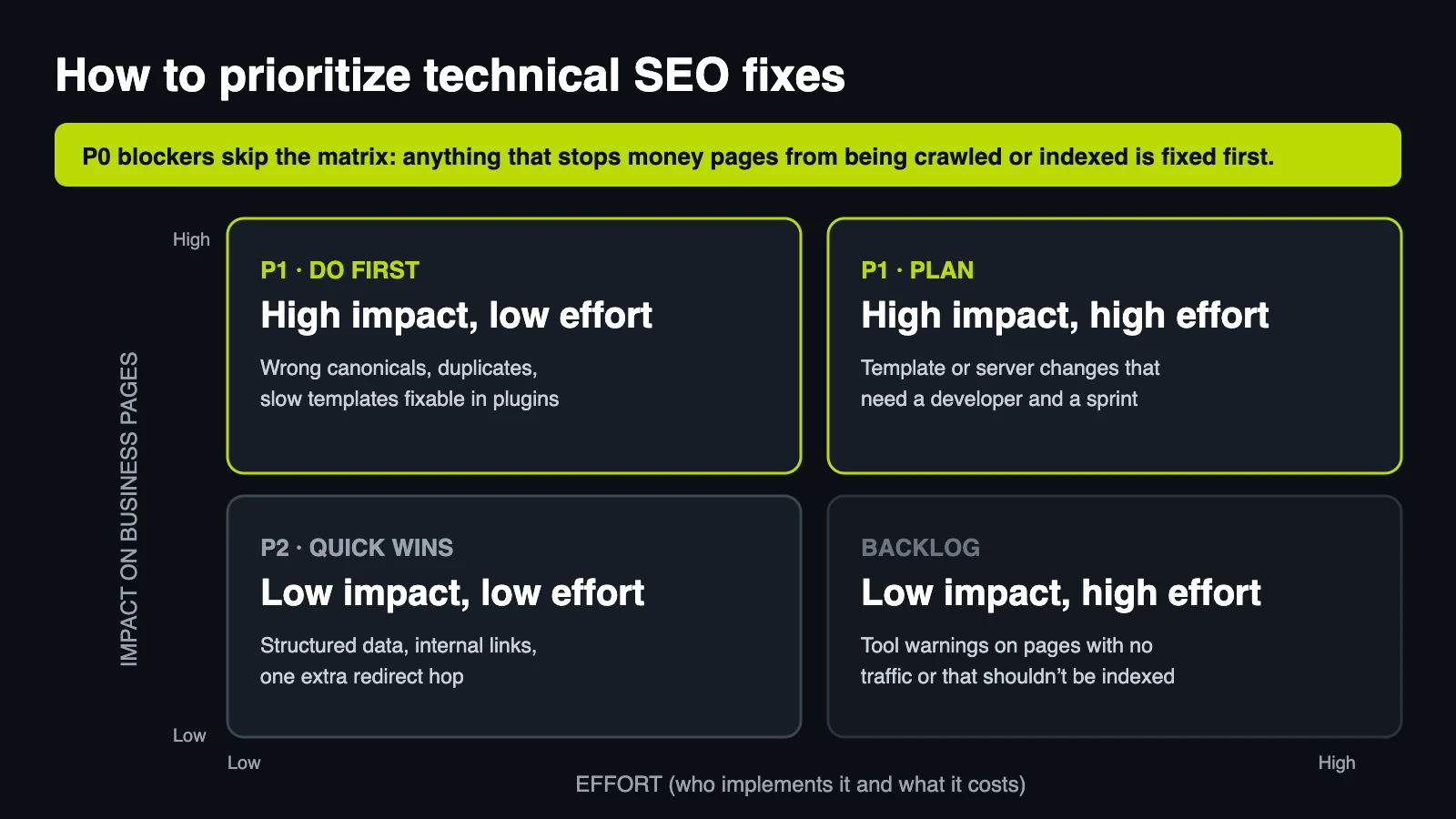
Audit tools sort by technical severity, not business impact. An “error” across 300 tag pages nobody searches for matters less than a noindex on the service page that generates your leads. Ask three questions about each finding:
- Does it block crawling, rendering or indexing of pages that sell or capture leads? If yes, it goes first, even if it affects one URL.
- How many URLs does it affect, and which ones? A problem in the template for every product page is not the same as one in an old blog post.
- Who implements it, and what does it cost? A change in your SEO plugin takes minutes. A change to the server or theme code needs a developer and carries risk.
That sorts the list into four levels:
| Level | What goes here | Examples | When |
|---|---|---|---|
| P0: blocker | Stops business pages from being crawled or indexed | noindex or robots.txt block on service pages, 5xx errors, broken redirects after a migration | Immediately |
| P1: high impact | Affects templates or many relevant URLs | Wrong canonicals, parameter duplicates, failing Core Web Vitals on main templates | First month |
| P2: improvement | Helps, but doesn’t unblock anything | Structured data, one extra redirect hop, internal links toward services | Following months |
| Backlog | Flagged by the tool, rarely moves results | Text-to-HTML ratio, multiple H1s on pages with no traffic, warnings on URLs that shouldn’t be indexed | Only with spare capacity |
A cheap P2 can jump ahead of an expensive P1 if the P1 depends on a developer who isn’t available. A P0 never waits.
What we found auditing our own site
We ran this same order on velogigx.com, a WordPress site built on a commercial theme. If we sell performance and technical SEO, our own site has to show it.
One of the heaviest findings was about indexing, not speed: the theme shipped with demo pages that were published and indexable (sample testimonials, fictional services, design categories). None had anything to do with our services, so we set them to noindex.
On speed, the obvious suspect was the homepage slider. Measuring showed the bottleneck was elsewhere: the way our caching plugin generated optimized CSS for each page (LiteSpeed’s UCSS), which was processing URLs that didn’t need it, such as pagination. After excluding those paths and clearing the generation queues, the mobile homepage scored 98 in PageSpeed Insights in November 2026. That is a lab result; with the site’s current traffic, the field assessment still depends on collecting real visits.
As P2 work, we connected our structured data (the company as ProfessionalService, plus a Service node per service page) and launched the English version under /en/, with its own URLs and hreflang so the two languages don’t compete as duplicates.
The lesson isn’t that sliders are always innocent. It is that prioritizing starts with measuring. Rebuilding the homepage to remove the slider would have spent most of the effort on something that didn’t move the metric.
If you only have one hour
Open the Page indexing report in Search Console. Confirm that your service, contact and main product pages are indexed and return 200. If one isn’t, that’s your P0 and everything else can wait. If they all are and traffic still isn’t growing, the problem is probably not technical. When you need that diagnosis ranked by business impact instead of by number of warnings, it is where our SEO services start.
FAQ
How often should you run a technical SEO audit?
Search Console emails you about new issues, so a quick review can be monthly. A full audit makes sense every few months, and always before and after big changes: a migration, a redesign, or a new theme or host.
Do you need a developer to fix technical SEO issues?
Not for everything. On WordPress, many P0 and P1 fixes (noindex, canonicals, sitemaps, simple redirects) can be handled in the SEO plugin. Server configuration, theme code and JavaScript rendering issues do need someone who can work with code.